


Views: 0 Author: Site Editor Publish Time: 2026-09-21 Origin: Site


Are you still wasting money on expensive ink cartridges, or spending late nights manually cutting and taping paper labels to cardboard boxes? As an engineer who has optimized countless warehouse workflows, I can tell you firsthand: standard office printers drastically slow down fulfillment. They ultimately bleed your profit margins. To solve this operational bottleneck, upgrading to a specialized thermal printer is the ultimate game-changer. In this guide, we will break down the mechanics of this technology, walk through the carrier setup process, and provide actionable, on-the-floor tips for streamlining your daily shipping routine.
No Ink Required: Direct thermal technology utilizes targeted heat to activate chemical properties on specific paper, completely eliminating the ongoing expense of ink cartridges or toner.
Time & Cost Efficiency: Processing logistics with a dedicated device is significantly faster and more cost-effective per unit. It produces professional, smudge-proof barcodes that drastically reduce carrier scanning errors.
Seamless Integration: Contemporary label printing devices offer native compatibility with major logistics carriers (UPS, USPS, FedEx) and popular e-commerce platforms (Shopify, Etsy, Amazon).
Agile Hardware Selection: For operations requiring space optimization or mobile capabilities, investing in a compact, Bluetooth-enabled device is a practical decision for modern retail workflows.
Recent logistics data reveals a massive macro-trend in the e-commerce space: the rapid shift toward decentralized fulfillment and micro-warehousing. Independent sellers are increasingly moving away from centralized third-party logistics (3PL) to manage inventory in-house. Consequently, the demand for agile, cost-effective hardware has surged. Sellers are no longer tethered to massive warehouse workstations. Instead, modern retail demands mobile, wireless devices that can print directly from a smartphone at a pop-up shop, a garage packing station, or a trade show booth.
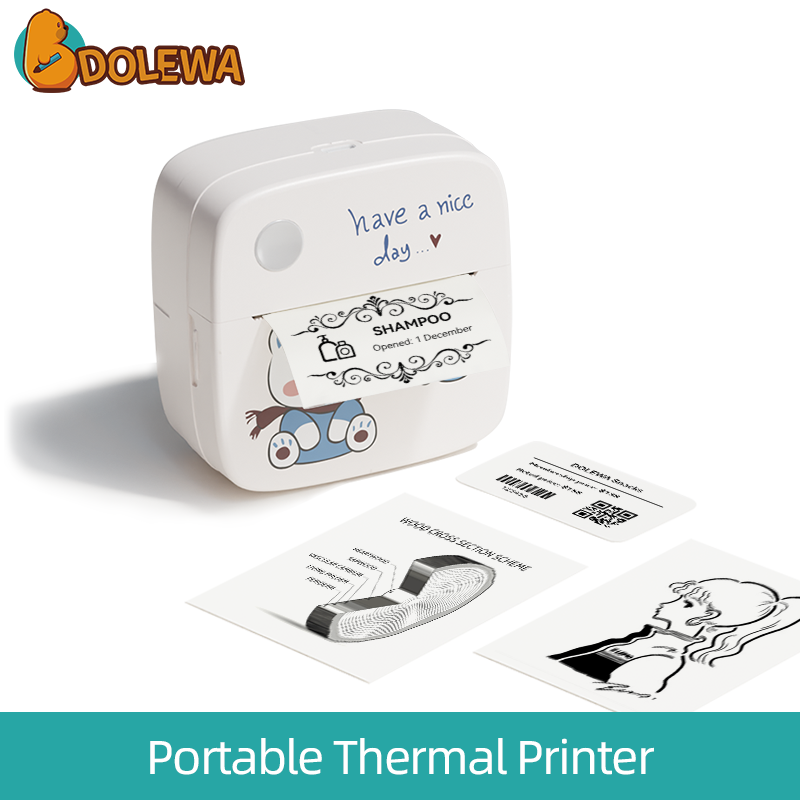
For anyone transitioning from standard office equipment to dedicated fulfillment hardware, understanding the underlying mechanics is crucial. A thermal printing device doesn't spray liquid ink. Instead, it produces crisp images by selectively heating coated thermochromic paper via a ceramic print head. Unlike traditional inkjet or laser models, these machines are engineered specifically for high-volume, single-color output. This specific design makes them the undisputed industry standard for logistics, warehousing, and retail operations.
When evaluating hardware, you will encounter two primary categories. Direct thermal technology applies heat directly to chemically treated paper. In contrast, thermal transfer utilizes a heated ribbon to melt wax or resin onto the receiving surface. For e-commerce shipping and return labels, direct thermal is the only logical choice. A tracking barcode only needs to remain legible during its brief transit period—typically 2 to 14 days. Therefore, the archival, decades-long durability of thermal transfer is simply unnecessary and overly expensive for daily fulfillment.
Transitioning to specialized fulfillment hardware requires an initial capital investment. However, the return on investment (ROI) is realized almost immediately through operational savings. The benefits extend far beyond mere cost reduction; they fundamentally improve the reliability of your entire shipping pipeline.
Feature | Direct Thermal Printer | Traditional Inkjet Printer |
|---|---|---|
Consumables Required | Only the thermal label roll itself | Expensive ink cartridges & standard paper |
Print Speed | High-speed continuous output (up to 150mm/s) | Slow, line-by-line mechanical processing |
Durability & Weathering | Smudge-proof, highly water-resistant | Highly prone to smearing from moisture/rain |
Operational Cost Per Label | Fractions of a single cent | Averages 5 to 10 cents per printed page |
The most substantial financial advantage is the complete elimination of liquid ink and toner. Because the print head relies entirely on the chemical composition of the label itself, your fulfillment expenses become highly predictable. Over a single fiscal year, a boutique brand shipping just twenty packages a day can save hundreds of dollars previously wasted on proprietary ink procurement.
In a busy warehouse environment, throughput speed directly impacts labor efficiency. Thermal technology is built for rapid, continuous output driven by precision stepper motors. Furthermore, carrier sorting facilities rely heavily on automated optical scanners. If a barcode is distorted by a rogue raindrop, the package gets kicked out for manual review, causing delays. Because these prints are created via a heat-induced chemical reaction, the resulting image repels water and oil, ensuring the barcode remains crisp and perfectly scan-ready.
The market offers a vast array of devices. Selecting the appropriate hardware requires analyzing your spatial constraints, workflow mobility, and software ecosystem. Let's look at the engineering specs that actually matter for a smooth operation.
The modern retail landscape is highly dynamic. Many entrepreneurs operate out of home offices, craft fairs, or mobile inventory units. Bulky industrial machines are entirely impractical in these scenarios. Investing in a compact portable thermal printer offers incredible flexibility. Modern mini units feature Bluetooth connectivity, allowing operators to route print jobs directly from smartphones or tablets. This completely bypasses the need for a tethered desktop computer.
Always verify the DPI (dots per inch) of the print head. A standard 203 DPI specification is perfectly engineered for standard shipping barcodes, providing sharp, scannable lines without unnecessary hardware costs. Additionally, while the 4" x 6" (100mm x 150mm) dimension is the universal standard for UPS, USPS, and FedEx, a versatile device should feature adjustable media guides. This ensures you can scale down to smaller formats, like 2" x 1" stickers, for internal SKU tracking.
Hardware installation can sometimes intimidate non-technical users. Yet, contemporary devices are designed for rapid, frictionless deployment. Following a systematic setup process ensures optimal print alignment and prevents wasted labels.
Before connecting the device to your PC or mobile app, the hardware must be physically calibrated to the specific media. First, insert the paper roll, ensuring the printable coated side faces the ceramic print head directly. Next, slide the internal media guides snugly against the paper edges to prevent diagonal shifting. Finally, run the automatic calibration sequence—usually by holding down the physical feed button until the indicator light flashes. This crucial step allows the internal optical sensors to measure the gap between labels accurately.
A printer driver acts as the software translator between your device and the hardware. For Windows and Mac setups, always download the latest driver package directly from the manufacturer's website. If you are using a mobile-first Bluetooth workflow, standard OS print dialogues usually won't work. You must download the manufacturer's proprietary app. Once installed, dive into the "Printer Preferences." If barcodes appear faded, increase the print density (darkness) setting. Conversely, if the heat bleeds and makes thick barcodes unscannable, lower the density and slightly reduce the print speed.
The true efficiency of this hardware is unlocked only when it communicates flawlessly with your order management software. Failing to configure these platforms correctly will result in labels printing sideways, too small, or spanning across multiple pages.
Carrier-specific software often defaults to standard 8.5" x 11" letter paper. To correct this formatting mismatch, navigate to the platform's shipping settings. Change the output format from "Laser/Inkjet" to "Thermal Print (4x6)". Platforms like Shopify, Etsy, and Amazon Seller Central offer native support for this exact format. Once configured, the system generates a PDF specifically scaled for the thermal dimensions, entirely eliminating the need to crop or resize documents manually.
A transparent and frictionless return process is a critical component of modern customer retention. Utilizing specialized printing hardware allows businesses to manage reverse logistics efficiently without creating headaches for the consumer.
Including a physical, pre-printed "Pay-on-Use" return label inside the original outbound package is a proven strategy for enhancing customer trust. The heat-activated paper is durable enough to survive the outbound trip without smudging. Alternatively, if you are handling on-site returns at a pop-up event, utilizing a mobile thermal printer empowers your staff to generate accurate carrier documentation directly from a smartphone right on the showroom floor. This immediate capability ensures return inventory is quickly tagged and re-entered into your system.
While this hardware is highly reliable due to having very few moving parts, regular maintenance is required to prolong the lifespan of the stepper motor and the ceramic print head.
Over time, paper dust and microscopic adhesive residue accumulate on the heating elements. This buildup acts as a thermal insulator, preventing heat from reaching the paper and causing vertical white streaks in your barcodes. To fix this, turn off the device and let the print head cool. Use a lint-free swab lightly dampened with 99% isopropyl alcohol and wipe across the print head in one single direction. Perform this simple routine every time you change a roll of labels.
If the machine starts skipping blank labels, the internal optical sensor has likely lost its calibration. Simply press and hold the feed button to force the machine to re-measure the media gaps. For faded prints, assuming the print head is perfectly clean, navigate to your OS driver settings and increase the heat density.
Upgrading your packaging workflow saves countless hours and significantly reduces overhead costs. A dedicated inkless machine eliminates expensive consumables while consistently producing professional, weather-resistant barcodes. If you are ready to modernize your fulfillment process, improve your customer return experience, and take control of your daily operations, it is time to make the switch. For a highly reliable, space-saving, and cost-effective solution, consider investing in the Dolewa Blue Bear Mini Portable Thermal Printer to keep your logistics pipeline moving flawlessly.
No. Direct thermal technology operates entirely without ink cartridges, ribbons, or toner. The device utilizes a specialized print head containing microscopic heating elements. When these elements heat up, they activate leuco dyes embedded within the chemically treated thermal paper, turning the targeted areas black. Your only ongoing consumable cost is the blank label rolls themselves.
Yes, but it is highly inefficient for business operations. Regular printers require expensive ink replacements. Furthermore, you must print on standard 8.5" x 11" paper, manually cut the labels to size, and secure them with clear packing tape. Additionally, standard inkjet ink is prone to smearing if exposed to rain or humidity during transit, which can render the barcode unscannable.
The universally accepted industry standard across all major global carriers—including UPS, USPS, FedEx, and DHL—is 4 inches wide by 6 inches long (4x6). This specific dimension provides ample space to clearly display the recipient address, routing codes, tracking numbers, and the primary scannable barcode.
While not entirely waterproof in the sense of surviving complete submersion, high-quality direct thermal labels are highly water-resistant and smudge-proof. Because the image is burned into the paper chemically rather than deposited as wet liquid, the text will not smear when exposed to rain, snow, or condensation.
Yes. Many modern devices are equipped with wireless connectivity options, including Bluetooth and Wi-Fi. By downloading the manufacturer's dedicated mobile application, users can generate and print shipping documents directly from iOS and Android smartphones or tablets. This feature is particularly beneficial for sellers managing inventory at pop-up events.
Direct thermal labels are sensitive to extreme environmental factors. If subjected to intense, direct sunlight or high ambient heat for prolonged periods, the chemically treated paper can darken or the print may fade. However, for the standard application of shipping labels—which typically only need to remain legible for a few weeks—the technology is exceptionally durable.
Standard direct thermal printers used for shipping are designed strictly for monochrome (black and white) output. The chemically treated shipping labels only react to heat by turning black. While specialized, multi-color thermal technologies exist for niche industrial applications, they are not utilized for standard logistics and e-commerce fulfillment.
This is usually caused by two common operational errors. First, the label roll might be inserted upside down; the heat-sensitive coated side must face the ceramic print head directly. Second, the printer may have lost its media calibration. Running a quick manual calibration allows the optical sensor to correctly detect the gaps between labels, preventing it from feeding blank pages.


